Orbit
A mobile concept that brings everyday shopping, conversations and calls, and short world updates together around one simple action: sharing something useful with the people you choose.
- Type
- Portfolio concept
- Year
- 2026
- Role
- Product & mobile UX/UI designer
- Category
- Mobile app · Concept
- Deliverables
- Product definition, UX flows, Visual system, Prototyping, Research plan
Contents
01 — Overview
Three services, one simple action
Orbit is a mobile concept for everyday life: shopping for essentials, talking to the people you care about, and keeping up with short updates from the wider world. Instead of a super-app menu, it is built around one action — sharing something useful, like a shopping list or a story, with the people you choose.
The work took a happy-path prototype and turned it into a product that holds up: hundreds of linked screen states, a token-based design system, and one data source that generates the Figma import, an interactive prototype and a review canvas.
- 441 screen statesDesigned, linked and checked — 49 core screens plus 392 commerce states
- 1,736 linksPrototype links, none of them to a missing screen
- 33 check groupsAutomated assertion groups passing in the interactive prototype
02 — Problem & context
From a happy path to a product that holds up
The brief: buy everyday products, message and call people, and follow the world. The challenge was making three services feel like one product — and making every journey survive real choices, mistakes and failures.
An audit of the first Figma prototype (10 primary screens, 71 destinations) found journeys that only worked when nothing went wrong.
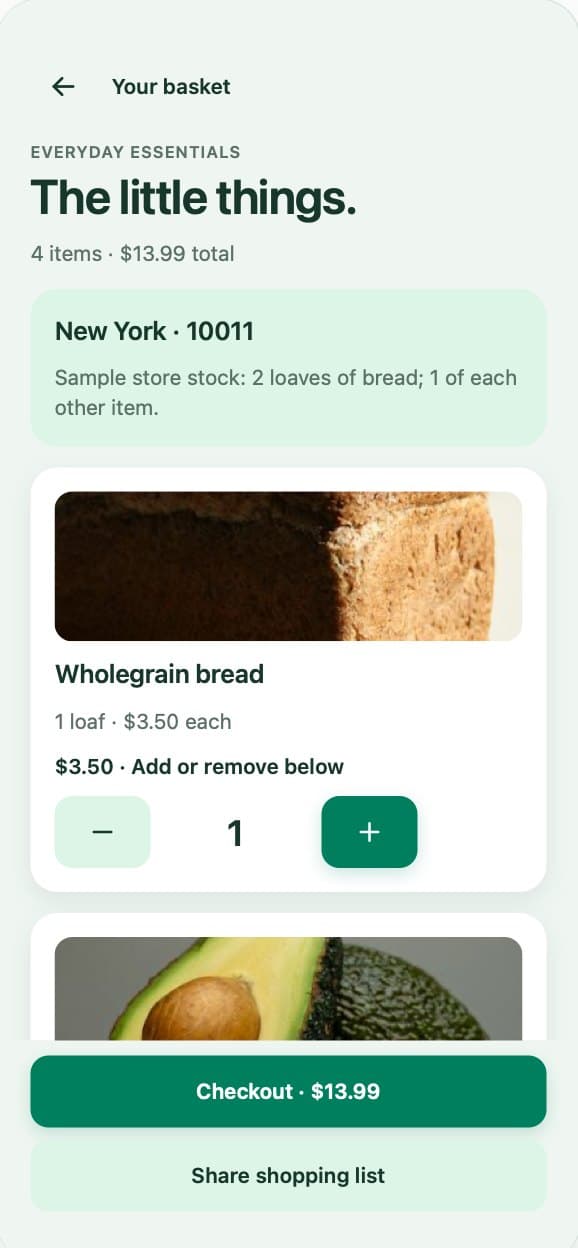
- Basket“Add” opened a prefilled basket, so quantities couldn’t really change.
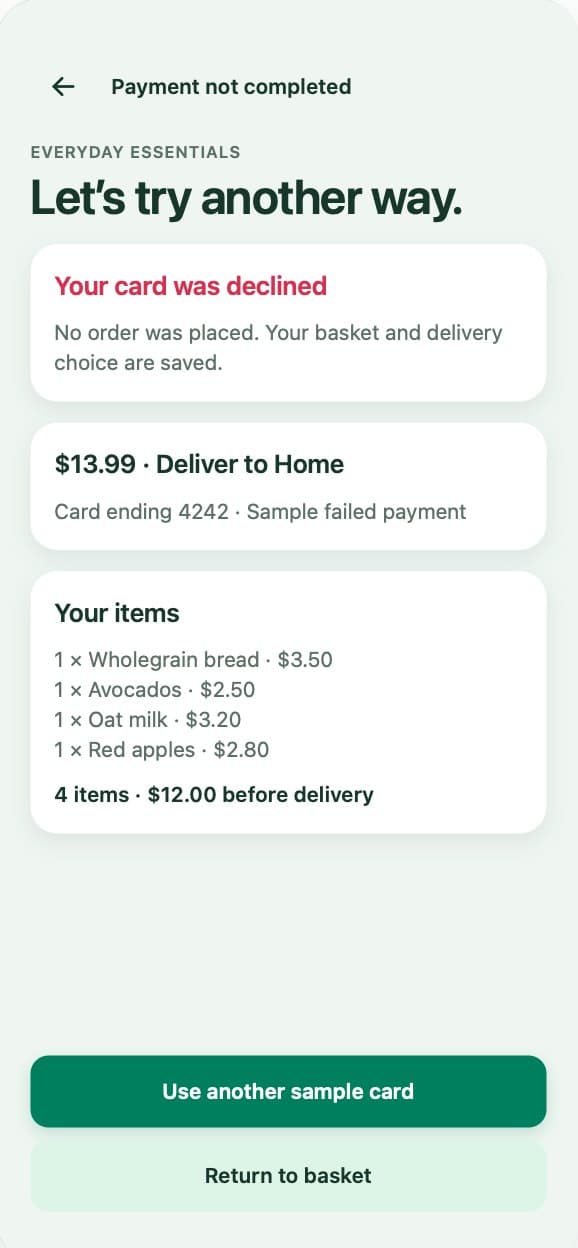
- CheckoutNo way to correct the address or card, and no order tracking.
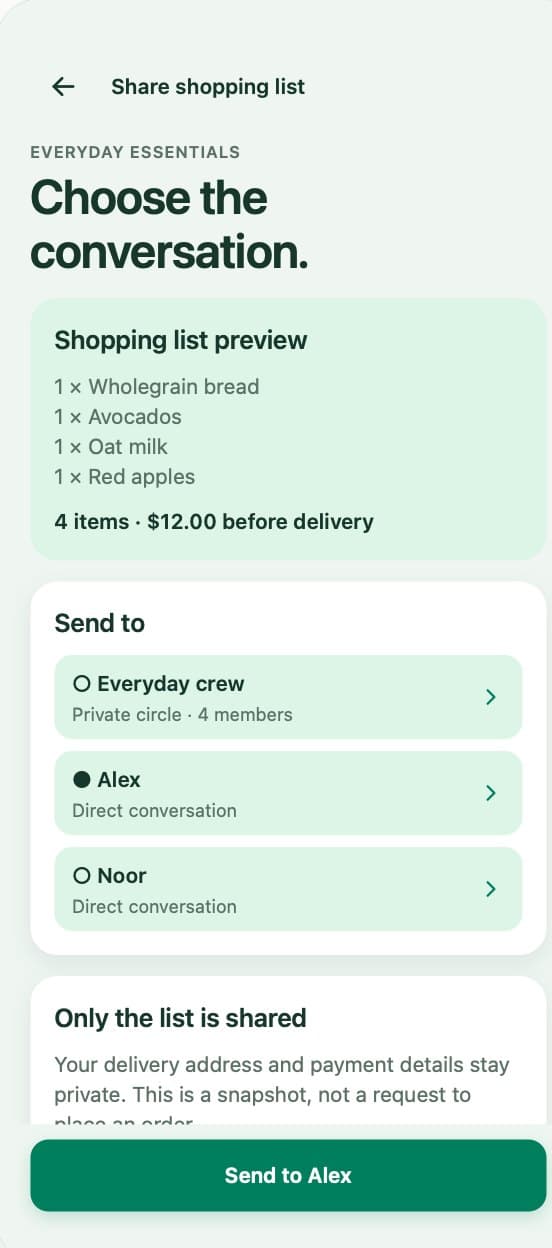
- SharingA group was preselected; the other recipients had no action.
- Missing statesNo sign-in, privacy and safety, permission or offline states.
- LayoutCheckout actions clipped, timestamps wrapped and some tap targets were small.
03 — Goals & constraints
One product, journeys that survive real use
Two goals came from the brief and a third from the file Orbit extends. Everything runs on simulated data — accounts, payments, permissions and messages — with a sample market of English, New York and US dollars.
- G1Make shopping, conversations and updates feel like one product
- G2Let every journey survive changed minds, mistakes and failures
- G3Extend the original Figma file without a visible seam
04 — My role
Product definition to prototype
I worked across the whole product: defining it, mapping the UX flows, building the visual system, prototyping, and planning the research to test it.
Tools: Figma variables, styles, components and prototyping; the Figma Plugin API; an HTML/CSS/JS prototype; a JSON data model; and AI coding assistants.
- Product definition
- UX flows
- Visual system
- Prototyping
- Research plan
05 — Research & insights
An audit, and a hypothesis to test
The audit showed where the first prototype broke: its journeys held only when nobody changed their mind, made a mistake or hit a failure.
The hypothesis behind Orbit: people may value moving a practical item, like a shopping list, or a conversation starter, like a story, straight into a chat with the people they care about. So Orbit is built around that one action rather than a menu of services.
It has been explored through design and prototyping, not yet tested with participants. A moderated usability study of six to eight sessions is planned.
One shared action, not a super-app menu.
06 — Flows & IA
Mapping every state
I listed what each journey needs when people change their mind, make a mistake or hit a failure — 47 core states, plus an overview and help — and covered the journeys end to end: sign-in and guest browsing; block, report and unblock; call permissions; offline and retry; order alerts and help; editing the basket; checkout; payment recovery; order tracking; and private sharing.
A small, disclosed stock model keeps the prototype truthful. Bread goes from 0 to 2 and the other items from 0 to 1, which gives 24 baskets; every − and + leads to the exact matching basket, so changing apples never resets bread. Prices are whole cents in one source, so a $13.99 basket reads $13.99 on the basket, checkout, payment-failure and tracking screens alike.
07 — Exploration
One token set, from Figma to every screen
New screens reuse the original file’s variables, text styles and button components exactly, so they sit beside the existing screens without a visible seam: 13 colour tokens plus an “Emerald depth” gradient, 8 SF Pro text styles, 5 radii and 3 elevations.
Every screen is the same small set of parts in the same order — header, eyebrow, heading, mint card, white card and a fixed footer — so 441 states read as one product. Every text and background pairing meets WCAG AA contrast, and touch targets are 44 to 56 px.
08 — Final interface
Decisions that make the journeys hold up
Each decision answers a problem from the audit or a risk in the hypothesis — and each has a cost that was accepted on purpose.
- 01 · One shared actionShopping, chats and updates connect through sharing: a basket or a story moves into a chosen conversation.
- 02 · Disclosed stockLimits are stated in the interface — “Sample stock limit reached” — so a static prototype behaves truthfully.
- 03 · Integer centsEvery total and line item comes from one price model, with no rounding drift.
- 04 · Design the failureA declined card keeps the basket, address and card: “No order was placed.”
- 05 · Private by defaultNo recipient is preselected, and only the list is shared — never the address or card.
- 06 · Access in contextThe microphone and camera are asked for when needed; a camera denial falls back to voice.
- 07 · Visible consequencesDestructive actions confirm first, reporting is separate from blocking, and unblocking is always available.
- 08 · Native to the fileNew screens reuse the file’s variables, styles, components and copy, word for word.
09 — Testing & iteration
Generated, then verified
Drawing 441 linked states by hand would drift — copy, totals and links would stop matching. So every screen is described once as data, and the Figma import, an interactive HTML prototype and a review canvas are all generated from it. The checks run in layers.
- Source preflight24 unique baskets, 1,736 links and 0 unknown destinations
- Prototype33 assertion groups and 10 browser journeys passed
- Canvas verifier0 problems — and it caught 5 of 5 planted defects
- Render check392 of 392 commerce boards fit their frames
- Original file102 journey assertions and 294 prototype actions, 0 invalid
10 — Outcomes & learnings
A working prototype, scoped honestly
The result is more than frames: 441 linked screen states and an interactive HTML companion that supports quantities from 0 to 10, sign-in, sharing, safety and recovery.
What isn't claimed: accounts, payments, permissions and messages are simulated, and no participant research has been run yet — so there are no user outcomes to report.
Next: finish and review the native Figma import, which is still in progress, run the moderated usability study, then refine from what people actually do.