Elovia
A fine-jewellery brand and store for a fictional label, designed in Figma and built as a live twelve-page Webflow site — working shopping interactions and scroll-led motion, with no custom code.
- Type
- Self-initiated concept
- Year
- 2026
- Role
- Solo designer: brand, UI, motion and build
- Category
- Fine jewellery · E-commerce website
- Deliverables
- Brand direction, Design system, 12 live pages, Shopping interactions, Motion system
Elovia is a fictional brand. The store is a design preview: checkout is switched off.
Contents
01 — Overview
A jewellery store that feels quietly alive
Elovia is a fictional fine-jewellery brand. I designed the brand and its store in Figma, then built it as a live twelve-page Webflow site: 14 pieces across four categories, working shopping interactions and scroll-led motion, using no custom code.
- 12 pagesDesigned, built and live on Webflow
- 39 interactionsFrom shop filters to scroll-led motion
- 0 linesOf custom code: Webflow classes, components and interactions only
02 — Problem & context
Bought on trust, where the photo is the product
Online, a shopper can’t hold the piece. The photos, the details and the small promises around the buy button do the work a shop counter would.
Elovia began as a minimal landing page in Figma. The job was to turn it into a believable store that stays calm but never feels static.
03 — Goals & constraints
Calm, but never static
The goal: a store calm enough for fine jewellery, alive enough to hold attention, and consistent in every promise it makes. The work ran in four steps — design the brand and landing page in Figma, build twelve pages in Webflow, review the build like a live store, then bring it to life with motion.
- No custom codeEverything is built from Webflow classes, components and interactions.
- A design previewCheckout is switched off and labelled, so the store never pretends to take money.
- Phones tooPhone layouts throughout; the pinned hero and cursor effects run only from 992 px up.
04 — My role
Solo, from brand to build
I was the only designer, and the builder. In Figma I set the brand direction, palette and type, the moodboard and the landing page. Beyond it I designed the screens a store needs: shop, product, collection, about and help pages.
In Webflow I built the whole site: layout, classes, interactions, SEO titles and social previews, alt text and the phone layouts. Tools: Figma, Webflow and AI image generation.
- Brand direction
- Visual design
- E-commerce UX
- Webflow build
- Interaction & motion
- SEO & social previews
05 — Research & insights
A live-store review of the first build
Before adding any motion, I reviewed the first Webflow build against a live-store checklist: offers, copy, imagery and access. It found promises that contradicted each other, and controls with nothing behind them.
The insight that shaped every decision after: a minimal store earns trust through consistency, and keeps attention with motion that always has a job.
- Three offersA FREE15FIRST code, “Buy 1 Get 1 Free” and “End of Winter: up to 40% off” — on a summer campaign.
- Two shipping numbersFree shipping over $100 in the top bar, but over $400 in the trust row.
- Mismatched photosHover photos showed a different piece from the one on the product card.
- Dead iconsAn icon-only header — search, wishlist, account and cart — with nothing behind it.
- Soft photographyBlurry, upscaled photos in several image slots.
- Missing answersNo shipping, sizing or care information before the buy button.
Calm isn’t the same as static.
06 — Flows & IA
From one landing page to a twelve-page store
The Figma file held one long homepage. A store needs somewhere for every question a shopper asks before paying, so the sitemap grew around the purchase path: Home, Shop and Product; Collection, About and Contact; three help pages and three policy pages.
The path has no dead ends. From Home or Shop, filter by category, choose metal and length on the product page, and Add to Bag opens a drawer that confirms the piece and free shipping, then offers checkout or continue shopping. Search opens a quick-find panel of categories and popular pieces from any page.
07 — Exploration
Warm neutrals, one dark accent, gold used sparingly
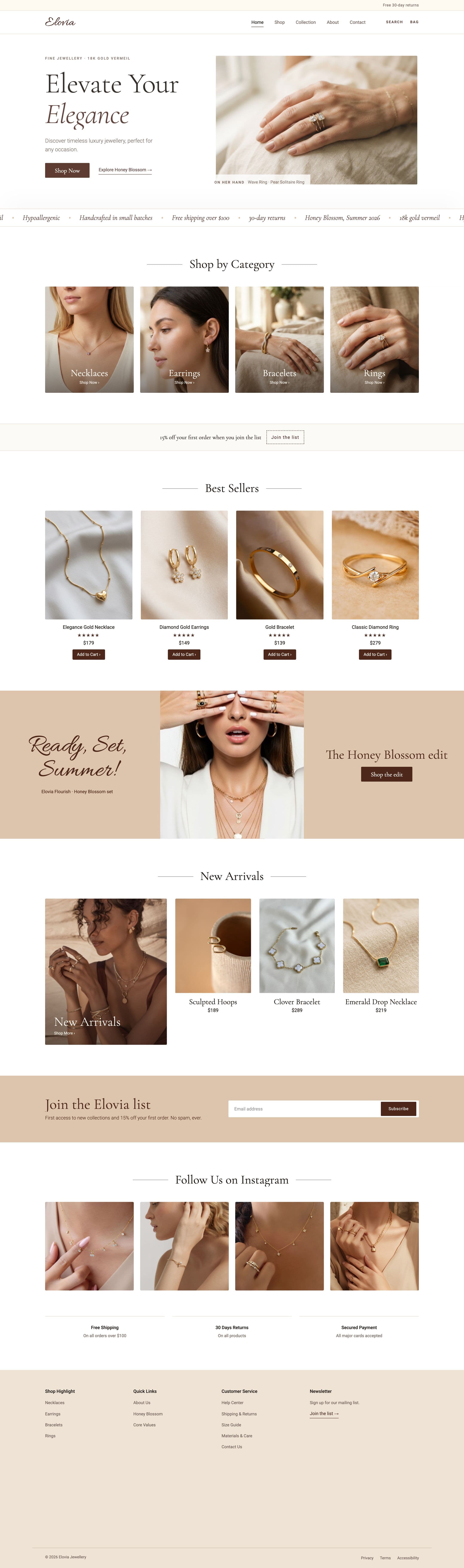
The palette borrows from the jewellery itself: linen, sand and cream backgrounds let 18k gold read warm, with one espresso brown for every action. Gold appears once, as the thin reading-progress line under the menu.
Three typefaces, one job each, and never more than two in a block: Cormorant Garamond for headlines, product names and buttons; Roboto for body copy, labels, prices and navigation; Allura only for the logo, the footer wordmark and the summer campaign. Buttons, metal swatches, length options and shop tabs were rebuilt as reusable Webflow classes, and every control is a real button with hover and selected states.
08 — Final interface
Browse by feeling, buy with every answer
The homepage sells a mood before a product: large photography, generous white space and one action per section. The shop is the opposite — fast scanning, real names and prices, and filters that answer “show me rings”.
Jewellery questions are specific: which metal, which length, will it irritate my skin, can I return it. The product page answers them in the order they come up, and keeps one action in reach on every screen size, down to a sticky buy bar on phones.
Two Framer sites set the bar for movement; the brief was to borrow their energy without their noise. Everything runs on Webflow Interactions: the hero pins while the store slides up over it, cards rise one after another like a display case, faint pieces from the edit trail the cursor on Collection, and a gold line tracks reading progress.
- 01 · One offer, not threeOne 15% first-order offer, tied to the newsletter, replaced a code bar, “Buy 1 Get 1 Free” and a 40% sale. Stacked discounts cheapen fine jewellery.
- 02 · One free-shipping number$100 everywhere: the top bar, the trust row, the product page and the bag. A promise that changes between screens reads like a trick.
- 03 · The same piece, wornEach card pairs a product photo with an on-model photo of that exact piece; where no match exists yet, hover shows a close-up. Six pieces still wait for a model photo.
- 04 · Words over icons“Search” and “Bag” replaced four icons, and both open real panels. Saving a piece moved to the product page.
- 05 · A trust layer before the askShipping & Returns, Size Guide and Materials & Care pages, plus a trust grid under Add to Bag: size, plating and allergy questions stall a purchase.
- 06 · Real controls, honest limitsNative buttons for metal, length, wishlist and Add to Bag. Checkout is switched off and labelled a design preview; the bag resets between pages.
- 07 · Pin the hero on desktop onlyThe curtain effect runs from 992 px up. A pinned block taller than a phone screen would hide the call to action.
- 08 · Sharper photography, or noneBlurry, upscaled photos were replaced with sharper originals or new matched pairs. In jewellery, a soft photo looks like a cheap product.
09 — Testing & iteration
Fix the promises first, then add movement
The review’s findings were fixed in the build first; motion came after. From the Figma file to the live site:
- OffersFrom a code bar, “Buy 1 Get 1 Free” and “up to 40% off” to one offer: 15% off your first order when you join the list.
- Free shippingFrom $100 in the top bar and $400 in the trust row to $100 everywhere it appears.
- HeaderFrom search, wishlist, account and cart icons to labelled Search and Bag, both opening working panels.
- Product namesFrom “Necklace”, “Bracelets” and “Earrings” to named pieces with prices, like Sculpted Hoops, $189.
- Footer linksFrom Women, Accessories and Product Details to real categories, plus shipping, size and care pages.
- Not tested yetNothing has been tested with shoppers. A five-person usability test of the product page comes next.
10 — Outcomes & learnings
Live, and honest about its limits
Done: twelve live pages, the shopping interactions, the motion system, SEO titles and social previews, alt text and phone layouts.
What isn’t claimed: Elovia is a fictional brand, and the store is a design preview — checkout is switched off and the bag resets between pages. Some product and model photos are AI-generated, and the Webflow build was made with AI assistance. There are no sales, traffic or user-testing results to report.
Next: matched model photos for the last six pieces, a bag that persists across pages, a five-person usability test of the product page, and a custom domain.
In jewellery, trust lives in the details. Motion only works once that’s true.