Archive Together
A 30-page website for an IT consulting studio with six practice areas: services visitors can enter by their priority, proof that builds trust, and two prototyped ways to start a conversation.
- Client
- Archive Together
- Year
- 2026
- Role
- Solo designer, end to end
- Category
- IT consulting · Client website
- Deliverables
- Site structure, Page templates, Component library, Motion specs, Prototyped journeys
Contents
01 — Overview
Six technical services, one clear way in
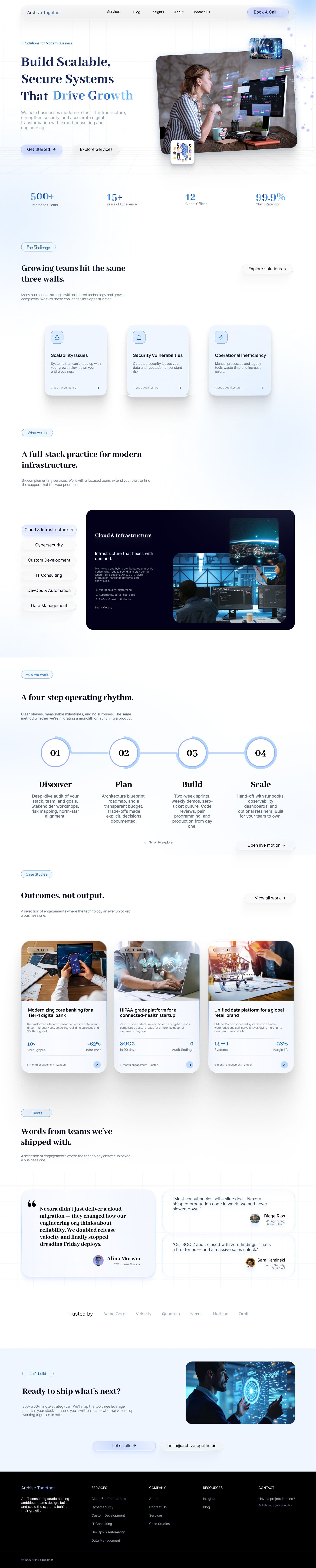
Archive Together helps teams design, build and scale the systems behind their growth. I designed its website end to end: 30 desktop pages where visitors can enter the services by their priority, find proof that builds trust, and start a conversation in two prototyped ways.
- 30 pagesDesktop pages designed at 1440 px
- 6 practicesService practices, each with its own page
- 8 statesInquiry and booking states, errors included
02 — Problem & context
Six practices that read alike
The site had to make six similar-sounding practices easy to tell apart, earn trust before anyone reaches out, and make the first conversation easy to start.
- SamenessCloud, cybersecurity, custom development, IT consulting, DevOps and data management read alike to a buyer who isn’t a specialist.
- TrustConsulting is intangible: visitors need proof of how the team works and what it has delivered before they get in touch.
- First contactA written inquiry and a booked call each have real edge cases — missing fields, failed sends, unavailable times, changed details.
- ToneThe look had to feel premium and modern without motion getting in the way of reading.
Start from the problem, see the proof, reach a person.
03 — Goals & constraints
One clear way in
The design goal: let a visitor start from the problem they have, see proof that the team can solve it, and reach a person in as few steps as possible. It was framed from the site’s structure and content. The work covers desktop at 1440 px; case-study pages draw only on the project summaries the client supplied, and every form uses clearly labelled example data.
- G1Help visitors tell six practices apart by the need they have
- G2Earn trust with a visible process and real case studies before contact
- G3Make a written inquiry or a booked call easy to start — and hard to lose
04 — My role
Solo, end to end
I was the only designer, from the site structure and page templates to the component library, the motion specs and the linked prototype.
Tools: Figma for design, components, variants and prototyping; Figma motion (Smart Animate); and AI assistants.
- Site structure
- Page templates
- Component library
- Motion specs
- Prototyping
- Handoff
05 — Research & insights
Framed from the content
The design goal was framed from the site’s structure and content, not from user research. Three working assumptions shaped it: buyers usually know their problem before they know a service’s name; consulting is intangible, so a visible process lowers the risk of getting in touch; and some buyers want to write a brief while others want to talk first.
Testing those assumptions with real buyers — the priority-led entry and both journeys — comes after launch.
06 — Flows & IA
Structure, templates and two forgiving journeys
Five navigation destinations plus Home, all sharing one header and footer: Services with six practice pages, Case studies with three studies, Insights with three guides, a Blog with three articles, About, and Contact. Every page is built from a small set of templates, so new services, case studies or articles can be added without redesigning anything.
Contact offers two ways to start a conversation, both prototyped from first click to confirmation. An inquiry runs from details to required fields, a failed send and sent; a booked call from choosing a time to details, review and confirmed.
07 — Exploration
Calm, technical, trustworthy
An editorial serif gives a technical subject a human voice, while a restrained navy and blue palette, soft ice surfaces and one dark accent keep the pages calm. Photography shows people at work, framed in floating clusters — never abstract stock art.
Every interactive part is a Figma component, and every state a developer must build sits beside it as its own frame: jelly buttons that swell on hover and squash on press, navigation with an active-page variant for each section, challenge cards from rest to lifted, a hero cluster with three motion keyframes, and a scroll-motion spec for the four-step process.
08 — Final interface
Decisions that make the site easy to act on
Each decision answers one of the challenges — and each has a cost that was accepted on purpose.
- 01 · Lead with priority“Start with your priority” turns six practices into three plain needs: a clearer plan, stronger foundations, or help to build and deliver.
- 02 · Problem before pitchHome names the “three walls” growing teams hit — scalability, security and operational inefficiency — before it lists services.
- 03 · Show how the work runsA four-step rhythm — Discover, Plan, Build, Scale — lists what each phase delivers, from workshops to runbooks.
- 04 · Two doorsAn inquiry form, plus Book A Call kept in the navigation and beside the form as “Talk it through”.
- 05 · Errors that keep your workRequired fields say exactly what’s missing, and a failed send keeps every detail, with Try again and Review details.
- 06 · Review before you commitBooking shows unavailable times, states the time zone and summarises when, who and what before confirming.
- 07 · Motion as feedbackJelly presses, card lift, navigation hover, the floating hero and scroll-linked steps, each drawn as named states.
- 08 · Honest prototype contentExample data is labelled, and states say what isn’t real: “This is a simulated error; no real submission has been attempted.”
09 — Outcomes & learnings
A handoff-ready prototype, scoped honestly
The result is 30 desktop pages — Home, a services overview and six practice pages, three case studies and their index, insights with three guides, a blog with three articles, About, Contact and eight flow states — plus a component library with its states and five interaction and motion specs for handoff. A prototype guide gives two entry points, Home and inquiry recovery, and every flow state is its own frame.
What isn’t claimed: the site isn’t launched yet, so there are no traffic, conversion or user-testing results. The prototype uses example data; nothing is sent or booked.
Next: launch, then track inquiries and booked calls, and test the priority-led service entry and both journeys with real buyers.